Monday, 17 August 2020

1.8" Color TFT LCD display - ST7735R compatible


https://www.adafruit.com/product/358

https://github.com/adafruit/Adafruit-ST7735-Library

https://www.xtronical.com/basics/displays/lcd-tft-colourcolor-display-128x128-pixelst7735-driver/lcd-tft-colourcolor-display-128x128-pixel-1-44inch-3-7cm-st7735-driver/

http://www.zonnepanelen.wouterlood.com/arduino-bare-basics/4-arduino-and-160x128-tft-display-with-a-st7735s-controller/


https://thesolaruniverse.wordpress.com/2019/12/24/connecting-a-240x240-tft-display-with-st7789-controller-with-a-nodemcu-esp8266-or-an-arduino-nano/


PINOUTS

LCD     ARDUINO NANO

GND --- GND 

VCC --- 3v3

SCL --- D13 SPI SCK

SDA --- D11 SPI MOSI

RES --- RST (set as -1 in code) // was D9*

DC  --- D9* (register select) choose pin // was D8*

CS  --- D10 SPI SS

BL  === (BACK LIGHT)???


This option needed because x0,y0 coordinate starts at an offset.


Tuesday, 7 August 2018

OLED + 4WD Hercules board


Tried hooking up an AdaFruit (clone) OLED  to a 4WD Hercules (incl motor controller) board. Too much used up after compilation. Error message:

Sketch uses 10366 bytes (33%) of program storage space. Maximum is 30720 bytes.
Global variables use 2140 bytes (104%) of dynamic memory, leaving -92 bytes for local variables. Maximum is 2048 bytes.
Not enough memory; see http://www.arduino.cc/en/Guide/Troubleshooting#size for tips on reducing your footprint.
Error compiling for board Arduino Pro or Pro Mini.

Apparently, the OLED display uses lots of memory, 1 KB or RAM according to this website:

https://learn.adafruit.com/memories-of-an-arduino/large-memory-consumers#step-5

(Screencap included)

Now, I need to have some input/output, either:

  1.  Two buttons + small display
  2.  Wireless "terminal"
Hmmm.... so, either:
  1.  Add another Arduino (mini?) with OLED --  data via UART between the two Arduinos; Plus two buttons
  2. Add HC05 BT module -- use mobile phone as terminal.
Pros/cons with option 1:  +++ Small enough to fit into a small breadboard --- Can't locate my Arduino mini at the moment. At home maybe? --- Need to put them all on a protoboard later or they will go "missing".

Pros/cons with option 2: +++ I think I have an HC05 module already +++ quick setup --- Have to have HP later during "running"

UPDATE:

It turned up that there are libraries for the OLED display that uses TEXT ONLY, thus not requiring large RAM -- the screen is not buffered/duplicated for graphics... yeay!!!

Discussion about it here: https://forum.arduino.cc/index.php?topic=335594.0

The library: https://github.com/greiman/SSD1306Ascii. Downloaded this one as a ZIP, extracted into the my Arduino Library folder, removed some of the files (docs), move the filed from the SRC folder out to the main folder.... It worked!!! (see pic).


Another library but works for SPI only:

https://github.com/stanleyseow/ArduinoTracker-MicroAPRS/tree/master/libraries/SSD1306_text. (This one is discussed elsewhere on the net)

Tried this one first, did not notice "SPI" (he he he.... duh!). Of course did not work. But keeping it here for reference. (Hmmm this part is giving weird formatting problem in blogger.com. Oh I know.. the "less than" symbol is mesing things up.. OK fixed.)

Monday, 9 July 2018

Revisiting a small OLED that I have lying around for quite some time.

This morning I hooked up a small OLED display module that I found again -- was looking for it a couple of weeks back -- just to refresh my memory how it works.

Well, it did not work ... hahaha.

I don't know what is wrong with it. Thinking of getting a new one. I like that display because it uses I2C inteface. So, saves on many many pins on the Arduino.

Some URLs that will be useful (for me, at least) when setting up this OLED...


Friday, 15 December 2017

Serial terminal basics

https://learn.sparkfun.com/tutorials/terminal-basics/command-line-windows-mac-linux

Friday, 19 February 2016

Program "Maze Generator"

Rajah 1: Maze Generator, Compute! December 1981
Lagi sekali, kita selongkar majalah Compute! di www.archive.org. Kali ini kita lihat isu 19, Disember 1981.  Ada suatu artikel di mukasurat 54 serta program yang menarik perhatian saya iaitu "Maze Generator".

Ianya ialah mengenai suatu algotrima pendek yang mampu menghasilkan sebuah maze secara rawak. Perinciannya meliputi komputer Commodore Pet (Microsoft BASIC) dan Atari 400/800. Contoh maze yang terhasil adalah seperti dalam Rajah 2.

Rajah 2: Contoh Maze
Rajah 3: Carta Alir "Maze Generator"
Algoritmanya adalah seperti dalam Rajah 3. Asasnya, maze dibina di dalam sebuah medan yang dinamakan "Background field" (BF). Ia terdiri daripada baris-baris (Y) yang jumlahnya ganjil. Setiap baris pula terbina dengan sel-sel (X) yang juga jumlahnya ganjil. Ianya membentuk jajaran (array) 2 dimensi X*Y; dengan koordinat (X,Y) = (0,0) terletak di penjuru atas-kanan.

"Maze Generator"

Pembinaan maze dimulakan dengan meletak penanda khas di sel (1,1). Kemudian nombor rawak 0 - 3 dipilih untuk menentukan arah pergerakan ke sel baharu (B). Sel baharu ini terletak selang satu sel daripada sel asal (A). Sel (penghadang) yang berada di antara dua sel tadi -- (A) dan (B) -- dipadam. Sekarang sel (B) menjadi sel (A); dan proses tadi diulang untuk mencari sel (b) yang baru; sehingga ketemu "jalan buntu".

Jika kebuntuan terjadi kurang daripada lima langkah, laluan yang telah terlakar akan diunduri sehingga bertemu dengan sel yang belum dipadam. Dari situ laluan baru akan dilakarkan dengan mengulangi lagi langkah-langkah tersebut di atas.

Program versi Microsoft BASIC

Berikut ialah program yang ditulis dengen Microsoft BASIC untuk Commodore Pet:


Wednesday, 10 February 2016

Pentomino versi Python

Ini adalah beberapa rakaman video (youtube) yang saya buat bagi program 'PENTOMINOS' yang saya tulis semula dalam Python. Saja untuk suka-suka. Video yang pertama ini ialah untuk puzzle bersaiz 3x20 sel.

3x20 sel

Program asal adalah seperti yang dibincangkan dalam pos bertajuk "Pentominos: A Puzzle-Solving Program | The BASIC Programs". Program asal ditulis dalam bahasa BASIC untuk mikrokomputer Commodore. Versi Python ini adalah lebih-kurang berdasarkan program BASIC yang asal.

Algoritma utamanya ialah seperti berikut:

slotno = 0
while slotno < 12:
full = get_next_empty_spot()
if full:
end
while not all_pieces_tried( slotno ):
p = get_untried_piece( slotno )
if p==-1: break
fit = try_piece( p, slotno )
if fit:
place_piece( p, nextrot, slotno )
pieceno[slotno] = p
rotation[slotno] = nextrot
slotno = slotno + 1
break
else:
tried[slotno][p] = True
if not fit:
reset_unused_pieces( slotno )
slotno = slotno - 1
if slotno<0: slotno="0</font">
undraw_piece( slotno )

Berikut ini adalah rakaman-rakaman video untuk puzzle bersaiz 4x15, 5x12 dan 6x10.


4x15 sel


5x12 sel


6x10 sel

Monday, 12 October 2015

Pentominos: A Puzzle-Solving Program | The BASIC Programs

These are the BASIC programs based on previous entry "Pentominos: A Puzzle-Solving Program".

This is a video capture of the original program running in a C64 emulator.


This one is an "improved" version


This one has been somewhat "decorated"


Saturday, 5 September 2015

Pentominos: A Puzzle-Solving Program


There was an article and type-in programs published in the  May 1984 issue of Compute! magazine. The original program was called "Pentominos", written by the legendary Jim Butterfield, who also wrote the accompanying article. Several versions for various 8-bit microcomputer of that time were also included. 

Pentominos reminds me of "tetris". Where each peace of tetris consists of four squares, a pentomino is built of five squares. Similarly, the puzzle is solved by fitting the pieces into a container. However, in this case, the puzzle-solving is done by the computer instead.

The whole article, well most of it anyway, excluding the program listings and the advertisements, are reproduced here. The programs will follow later... in a little while.... 

PENTOMINOS
A Puzzle-Solving Program
Jim Butterfield, Associate Editor 
Computers can solve puzzles. With the right set of instructions, a program will follow the same logic as humans, trying things to see if they fit. It's interesting to watch the computer working in this way.
This famous puzzle is dealt with at some length in Arthur C. Clarke's novel Imperial Earth. The characters of the novel don't use a computer to solve the puzzle.
The original program works on all Commodore computers. Additional versions are included here for the Atari, IBM PC and PCjr, T1-99/4A, Radio Shack Color Computer, and Apple.
NOTE: IBM, Tl, Color Computer, and Apple users should insert lines 110-860 from Program 1, the Commodore version, into their programs. The rem statements at the ends of these lines should be ignored.
-------------------------------------
Pentominos are like dominos, except that they are made up of five elements rather than two. If we put five squares end to end and glued them together, we'd get a long strip, often called the I pentomino. On the other hand, if we took a central square and glued the other four squares to the sides, top, and bottom, we'd get something that looks like a plus sign, which many people call the X pentomino.
Allowing for the differences that are caused by rotating or turning over a piece, there are 12 different pentominos. They are shown in Figure 1; but you might find it fun to try discovering them yourself by drawing them out on a piece of paper. Most of them look a little like letters—you can see a T, an X, and a W among them, for example.
What's The Puzzle?
The 12 different pentominos, each with an area of 5 squares, give a total of 60 squares. Suppose you had to cut these pentominos out of a rectangle without wasting any space: How big would the rectangle need to be?
We know two things: The total area is 60 squares; and the rectangle must be at least three wide (otherwise, we couldn't cut out the plus sign). So it might be possible to get all the pentominos from a rectangle that is 3 x 20, or 4 x 15, or 5 x 12, or 6 x 10. As it turns out, we can do it in any of these ways.
We can turn the question inside out and put it this way: Can you fit all 12 pentominos into a rectangle of size: 3 x 20, or 4 x 15, or 5 x 12, or 6x10?
The Brain Bender
Don't let the following computer program take the fun out of the puzzle for you. Cut the pieces out of cardboard and try your hand at the puzzle. It's an interesting way to wile away the hours. 6x10 and 5 x 12 are not too hard; 4x15 will make you work; and 3 x 20, which seems at first to be the easiest, proves to be a real brain bender.
A sample solution to the 4x15 problem is given in Figure 2.
If humans can waste time trying to fit the pieces, computers can do it too. "Pentominos" does not run at blinding speed; it tries the pieces at about the same speed as humans do. It's dumber than human puzzle solvers: It will try to make a piece fit in places we know instinctively are hopeless. But the computer has no intuition: It will plod along, making dumb moves until it finds a combination that fits.
The program tries the pieces "visibly"—that is, you can see it putting the pieces in place, thinking about its next move, and then taking a piece back out when it becomes obvious (even to the dumb computer) that it can't work there.
In a moment we'll get to more detail on how it works. The computer always thinks about fitting the upper-leftmost empty square, and it will tell you which piece it is trying to fit there; that piece's identity will be shown in a corner of the screen. So you can track the computer's thoughts if you wish.
It can take a few minutes or several hours to find the next solution. This program is a good one to set up for an overnight run. You might want to turn off your TV set or monitor and let the computer hum away quietly all by itself.
When a solution is found, you can type CONT at any blank place on the screen, and the computer will go after the next solution.
How It Works
The pentominos and all their possible rotations are stored in DATA statements. Only four squares need to be described for each pentomino rotation, since the information gives coordinates based upon the starting square.
After reading in the data, the computer uses the following logic. Line numbers are given for those who would like to try examining the program.
1. (Line 2010) The computer looks through the list of pieces to find the first one that isn't being used. Then it searches the board for a blank square, starting at the left and searching each column top to bottom. That's the next place it will try to fit a piece. If it can't find a blank, we have a solution and will go to step 5.
2. (Line 2030) The piece just picked is set to its first rotation.
3. (Line 2060) The computer tries to fit the piece starting at the square it has identified. If it doesn't fit, it will skip ahead to step 7.
4. (Line 2120) The piece fits, so the computer puts it onto the board, onto the screen, and marks off the piece as used. It then goes back to step 1 to look for a new place to fit pieces.
5. (Line 2170) We have a solution! Stop and wait for the user to admire us. If the user types CONT, we'll keep going into step 6.
6. (Line 2190) We've reached a dead end, so we go back and remove the last piece placed on the board. If there are no pieces left, we quit; at this point we will have found all the solutions.
7. (Line 2260) Let's rotate the current piece so that we can try it in a different way. If we can find a new rotation, we go back to step 3 to try the piece. If not, we continue to step 8.
8. (Line 2300) The computer looks through the list of pieces to find the next piece to be tried. Then it goes back to step 2. 
Variables And Arrays
If you're trying to read the program, it will be worthwhile to have some information on variables and arrays. Here are some useful ones:
Array B(X,Y) is the board. If the value is zero, that part of the board is blank. When a board square is used, the appropriate value in this array is set to the number of the occupying piece; but the important thing to remember is that it's set to nonzero.
The DATA statements show all rotations of all pieces. They are transferred to arrays X and Y:
Arrays X(rotation,C) and Y(rotation,C) tell where to find the squares (X and Y) of each piece's rotation. The rotation is taken from the DATA statements.
Array P(rotation) tells which piece is involved for each rotation of the above table.
Each Piece Has Data
Array P$(piece) is the name of the piece.
Array S(piece) tells where to find the starting rotation for piece X. 
Array T(piece) tells which rotation is currently being used (or tried) for piece X.
Arrays X2(piece) and X2{piece) list the starting square where piece A has been placed.
Tracking The Moves
Array U(move) lists the pieces in the order in which we tried them.
The piece under consideration is designated by P; its current rotation, of course, will be T(P).
When we place a piece, we log it into array U and use PI to keep track of how many pieces have been used.
Program Variations
The program could be speeded up significantly by using a compiler or by converting it to machine language. I have chosen not to do that for two reasons: compatibility and readability.
A machine language version would nevertheless be quite straightforward to write. No special math or other logic is involved. Such a program would be very fast. But it would not be universal, since different machines would need to load the program into different memory locations.
If you go for many solutions, you should realize that some of the solutions are transformations of others. Given one solution, others can be found by inverting it left to right or top to bottom.
This means that each solution is really four solutions; but the computer will find each of the four as it works. If this is not desired, the extra solutions can be eliminated by removing all but two of the rotations of a single eight-rotation piece. That way, the reflected solutions couldn't happen: That piece can appear in only one orientation.
For example, we could eliminate reflected solutions by changing line 770 to DATA R,2 and then deleting lines 800 to 850 inclusive.
Making It Smarter
The program would run faster if it didn't show its moves on the screen, but watching it work is most of the fun. For one thing, it may remind you of an important aspect of computers: They're dumb, but they're faithful.
The computer will lumber along, trying dumb moves. But it won't get tired, and it will eventually reach the solution.
Yes, we could add extra logic to make the computer smarter. We could ask the computer to scan for some of the obviously impossible situations that it does not recognize at all with the present program. But there's a danger: The computer could waste more time being smart than it does being dumb.
Copyright © 1984 Jim Butterfield

Friday, 20 August 2010

For every £ they are paid, tax accountants destroy £47, waste recyclers generate £12

The research, carried out by think tank the New Economics Foundation, says hospital cleaners create £10 of value for every £1 they are paid. It claims bankers are a drain on the country because of the damage they caused to the global economy. They reportedly destroy £7 of value for every £1 they earn.

Meanwhile, senior advertising executives are said to "create stress". The study says they are responsible for campaigns which create dissatisfaction and misery, and encourage over-consumption. And tax accountants damage the country by devising schemes to cut the amount of money available to the government, the research suggests. By contrast, child minders and waste recyclers are also doing jobs that create net wealth to the country.

The Foundation has used a new form of job evaluation to calculate the total contribution various jobs make to society, including for the first time the impact on communities and environment. Eilis Lawlor, spokeswoman for the New Economics Foundation, said: "Pay levels often don't reflect the true value that is being created. As a society, we need a pay structure which rewards those jobs that create most societal benefit rather than those that generate profits at the expense of society and the environment". She said the aim of the research was not to target individuals in highly paid jobs, or suggest people in low paid jobs should earn more. "The point we are making is more fundamental - that there should be a relationship between what we are paid and the value our work generates for society. We've found a way to calculate that," she said.

A total of six different jobs were analysed to assess their overall value. These are the study's main findings:

* The elite banker -- "Rather than being wealth creators bankers are being handsomely rewarded for bringing the global financial system to the brink of collapse Paid between £500,000 and £80m a year, leading bankers destroy £7 of value for every pound they generate".

* Childcare workers -- "Both for families and society as a whole, looking after children could not be more important. As well as providing a valuable service for families, they release earnings potential by allowing parents to continue working. For every pound they are paid they generate up to £9.50 worth of benefits to society."

* Hospital cleaners -- "Play a vital role in the workings of healthcare facilities. They not only clean hospitals and maintain hygiene standards but also contribute to wider health outcomes. For every pound paid, over £10 in social value is created."

* Advertising executives -- The industry "encourages high spending and indebtedness. It can create insatiable aspirations, fuelling feelings of dissatisfaction, inadequacy and stress. For a salary of between £50,000 and £12m top advertising executives destroy £11 of value for every pound in value they generate".

* Tax accountants -- "Every pound that a tax accountant saves a client is a pound which otherwise would have gone to HM Revenue. For a salary of between £75,000 and £200,000, tax accountants destroy £47 in value, for every pound they generate."

* Waste recycling workers -- "Do a range of different jobs that relate to processing and preventing waste and promoting recycling. Carbon emissions are significantly reduced. There is also a value in reusing goods. For every pound of value spent on wages, £12 of value is generated for society."

The research also makes a variety of policy recommendations to align pay more closely with the value of work. These include establishing a high pay commission, building social and environmental value into prices, and introducing more progressive taxation.

Wednesday, 18 August 2010

Wednesday, 14 July 2010

Tuesday, 13 July 2010

Thursday, 8 July 2010

Bukan Gajah Putih


Apa ini? Tentulah bukan gajah putih. Bentuknya tak macam gajah. Warnanya tak putih. Apa lah....

Guru


1980 vs 2010


Thursday, 1 July 2010

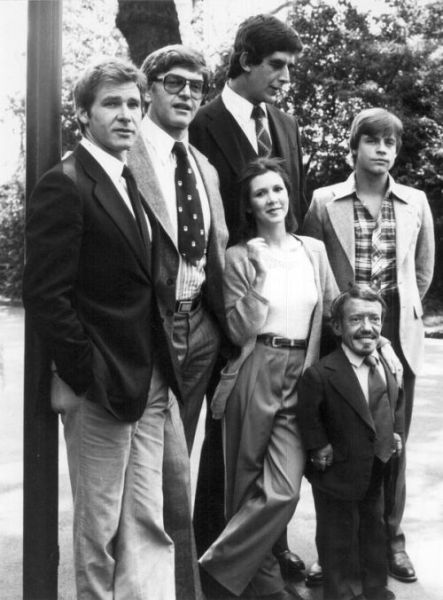
Star Wars

Han Solo, Darth Vader, Chewbacca, Leia, Luke Skywalker and R2D2

Wednesday, 26 May 2010

INTERNET di MOZAMBIQUE Lebih LAJU daripada di MALAYSIA

Average download speed:


  • 90 - Philippines (2.3 Mbps)


  • 99 - Mozambique (1.92 Mbps)


  • 100 - Albania (1.91 Mbps)


  • 101 - St Kitts and Nevis (1.89 Mbps)


  • 102 - Malaysia (1.88 Mbps)


  • (Want faster broadband? Try Mozambique)


    Automatically Unlocking the Default Gnome-Keyring : PAM Keyring

    Installing the Package
    We’ll need one tiny package for this to be supported. Using your favorite package manager install libpam-keyring, or use the following command:
    sudo aptitude install libpam-keyring
    Configuring PAM
    Once this is installed we need to add a few lines to a configuration file. Follow this next step carefully. If you put the line in the wrong place it may cause problems with other parts of machine authentication.
    Edit the /etc/pam.d/gdm file and append the following line to the end of the file:
    @include common-pamkeyring

    [full article here]